
Finding Lead and Account Duplicates with Salesforce Agent Script
Duplicate data is one of those CRM problems that is frustrating and can slow down the sales team. For this project, I built a Salesforce Agent Script agent that helps answer a very practical question:
How confident are we that this Lead represents this Account?
Instead of letting the agent guess, I connected it to deterministic Apex actions. The agent can have the conversation, but the scoring logic comes from Salesforce data and clear rules.
What I Built
The Lead Account Deduplication Agent supports three workflows:
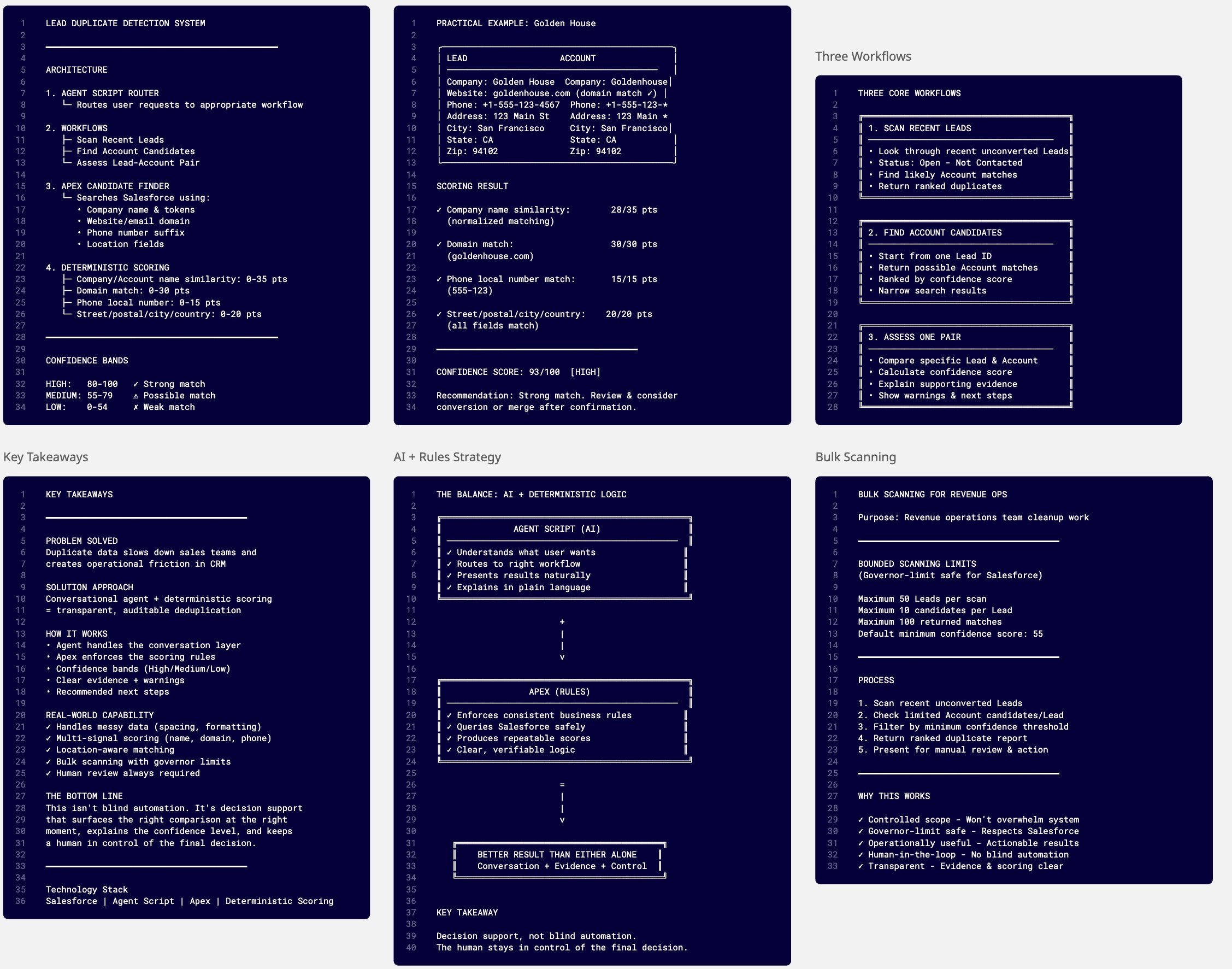
- Scan recent Leads: Look through recent unconverted Leads with the status
Open - Not Contactedand find likely existing Account matches. - Find Account candidates: Start from one Lead and return possible Account matches ranked by confidence.
- Assess one pair: Compare a specific Lead and Account and explain how confident the system is that they represent the same business.
This gives the seller a conversational interface, while still keeping the decision process transparent.
The Architecture
1. Agent Script Router
The Agent Script starts by routing the user to the right subagent. If the user asks to scan Leads broadly, it moves into the duplicate scanner. If the user gives a Lead ID, it finds candidate Accounts. If the user provides both a Lead and Account, it performs a direct confidence assessment.
The important part is that the agent is instructed not to claim certainty. It presents a confidence score, confidence band, supporting evidence, warnings, and the recommended next step.
2. Apex Candidate Finder
The candidate finder searches Salesforce for Accounts that could match a Lead. It uses practical signals such as:
- Company name and meaningful name tokens
- Website or email domain
- Phone number suffix
- City, street, and postal code prefix
The goal here is not to make the final decision immediately. The goal is to return a small, useful list of Accounts that are worth scoring.
3. Deterministic Confidence Scoring
The confidence action scores the Lead and Account pair using clear point-based evidence:
- Company or Account name similarity: up to 35 points
- Domain match: up to 30 points
- Phone local-number match: up to 15 points
- Street, postal code, city, and country: up to 20 points
Scores are capped at 100 and grouped into confidence bands:
- High: 80-100
- Medium: 55-79
- Low: 0-54
This makes the result easy to understand. A seller does not just see “possible duplicate”; they also see why the agent thinks so.
A Practical Example
In the test data, I used a Lead for Golden House and created an Account named Goldenhouse. A simple exact-name match could miss this because of the spacing difference. The scoring logic normalizes company names, checks phone numbers, and compares location fields.
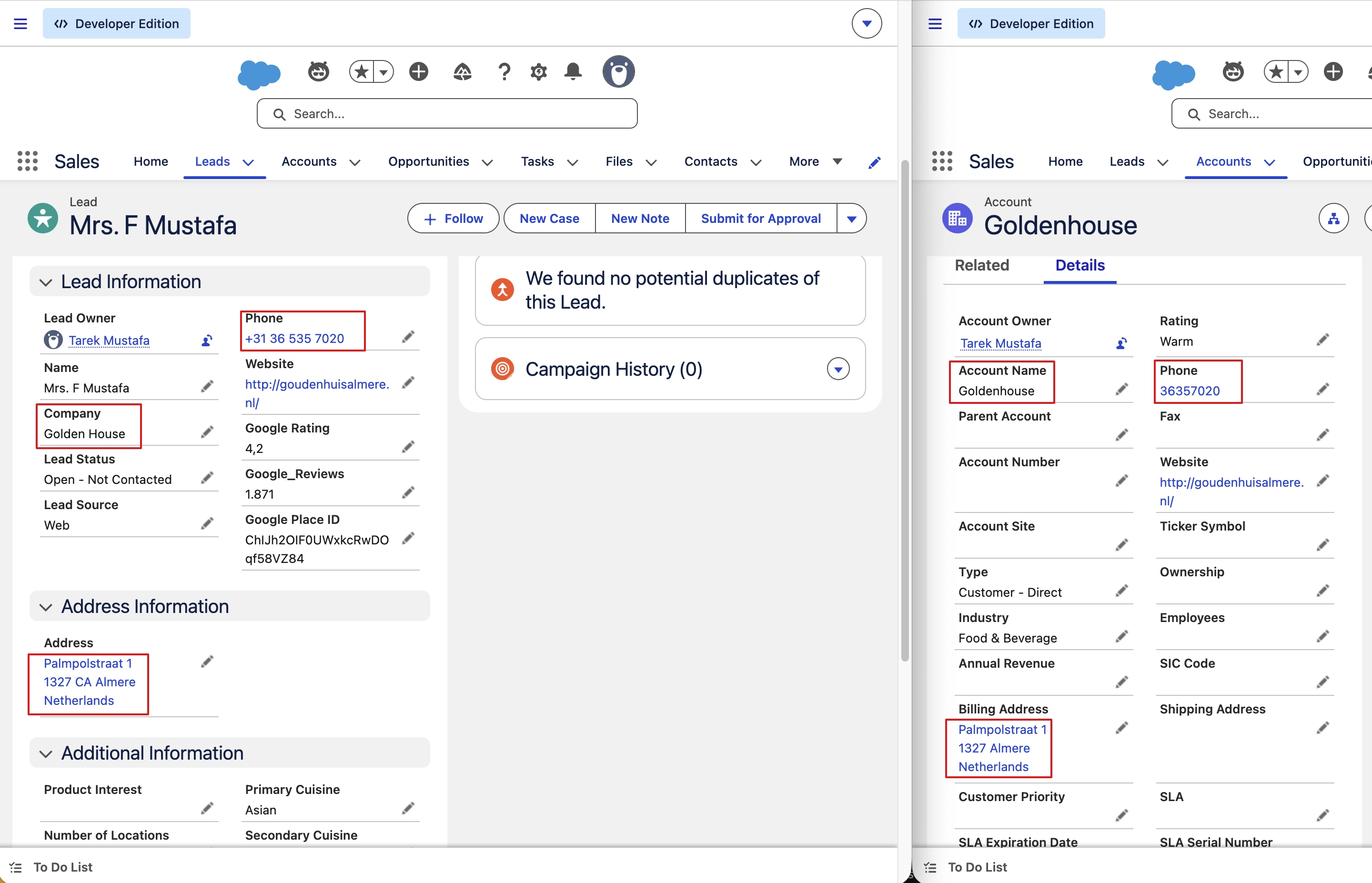
That means the system can still identify a likely relationship when the data is slightly messy, which is exactly what happens in real CRM environments.
The agent can then explain the result in plain language:
- The company names are a strong match after formatting is normalized.
- The phone numbers share the same local number.
- The address and city support the match.
- The result should still be reviewed before conversion or merge.
That last point matters. This is decision support, not blind automation.
Bulk Scanning for Revenue Operations
I also added a scanner action for broader cleanup work. It scans recent unconverted Leads, checks a limited number of Account candidates for each Lead, filters by a minimum confidence score, and returns a ranked duplicate report.
The scan is intentionally bounded for Salesforce governor-limit safety:
- Maximum 50 Leads per scan
- Maximum 10 candidates per Lead
- Maximum 100 returned matches
- Default minimum confidence score of 55
This makes it useful for operational review without turning the agent into an uncontrolled database crawler.
Why This Approach Works
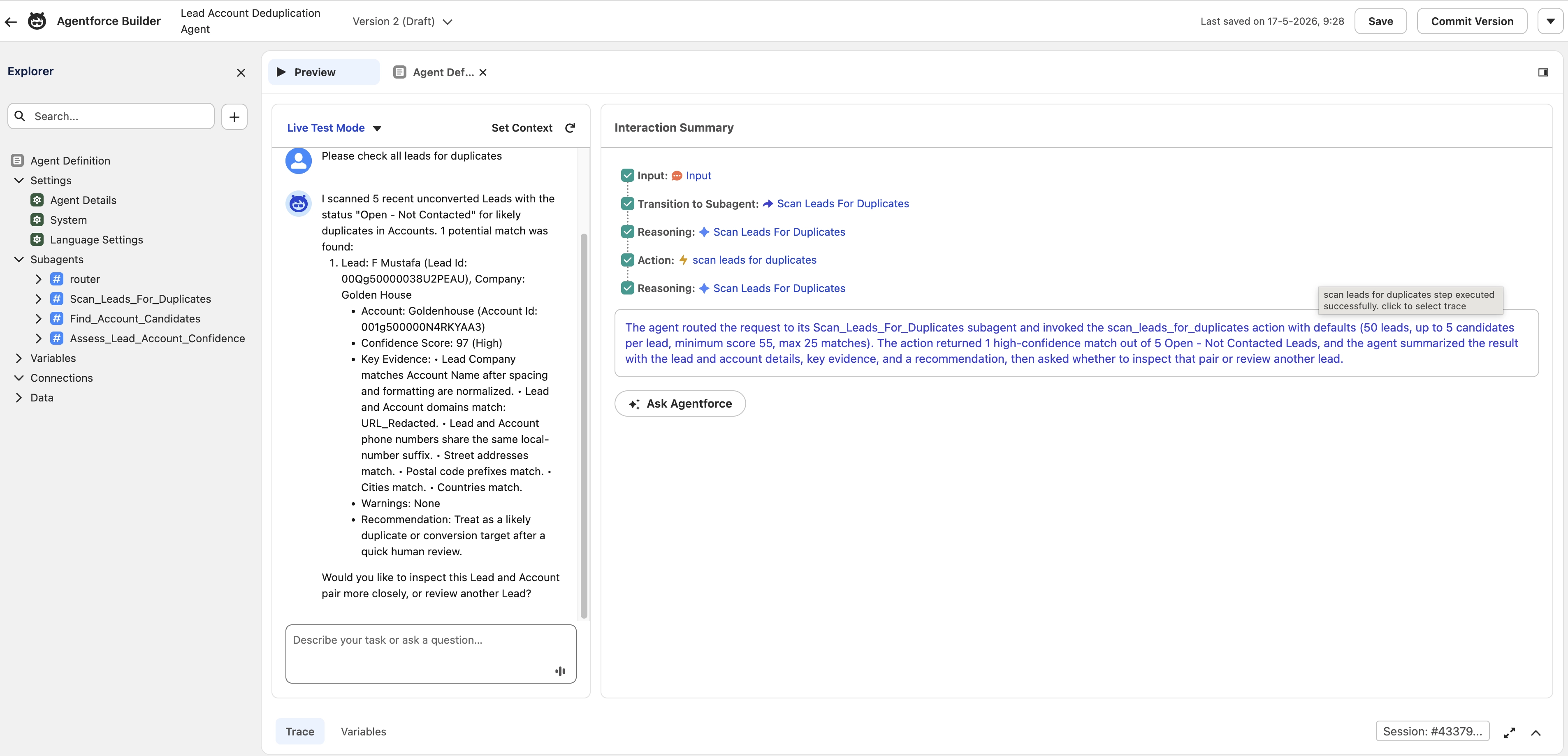
The most interesting part of this project is the balance between agentic conversation and deterministic logic.
Agentforce is great for understanding what the user wants and presenting results in a natural way. Apex is better for enforcing consistent business rules, querying Salesforce safely, and producing repeatable scores. Combining them gives a better result than relying on either one alone.
The agent handles the conversation. Apex handles the evidence.
Key Takeaways
This project made the deduplication process more usable by turning a technical CRM cleanup task into a guided conversation. A seller or admin can ask for duplicate candidates, inspect a specific Lead and Account pair, or scan open Leads for possible existing Accounts.
The output is not a vague AI answer. It is a structured confidence assessment with evidence, warnings, and a recommended next step.
The Bottom Line
With Agent Script and Apex actions, Salesforce can surface the right comparison at the right moment, explain the confidence level, and keep a human in control of the final decision.